/focus - Pre-entry dashboard
★ Premium
/focusputs everything you need before pulling the trigger on one coin onto a single screen: price, nearby structure, derivatives context and a chart - then lets you watch it update live.
What it does
/focus builds an on-demand pre-entry dashboard for any tradable Binance perpetual,
whether or not it is on your watchlist. It composes the current price, the nearest
structural levels and trendlines, open-interest and funding context, and a structural
chart into one message. Tap 🔴 Go Live to turn it into a self-updating monitor for the
next stretch of the move. It is read-only context to sharpen your own entry timing, not a
pushed signal.
How to use
Send the command with a ticker, optionally a timeframe:
/focus SOLUSDT
/focus SOLUSDT 5m
- Ticker can be short (
SOL) or full (SOLUSDT). - Supported timeframes: 1m and 5m. Default is 1m.
- Premium only. On the free tier the bot replies with an upgrade note.
The bot shows a brief "Building focus dashboard..." message, then replaces it with the dashboard (chart + text + buttons).
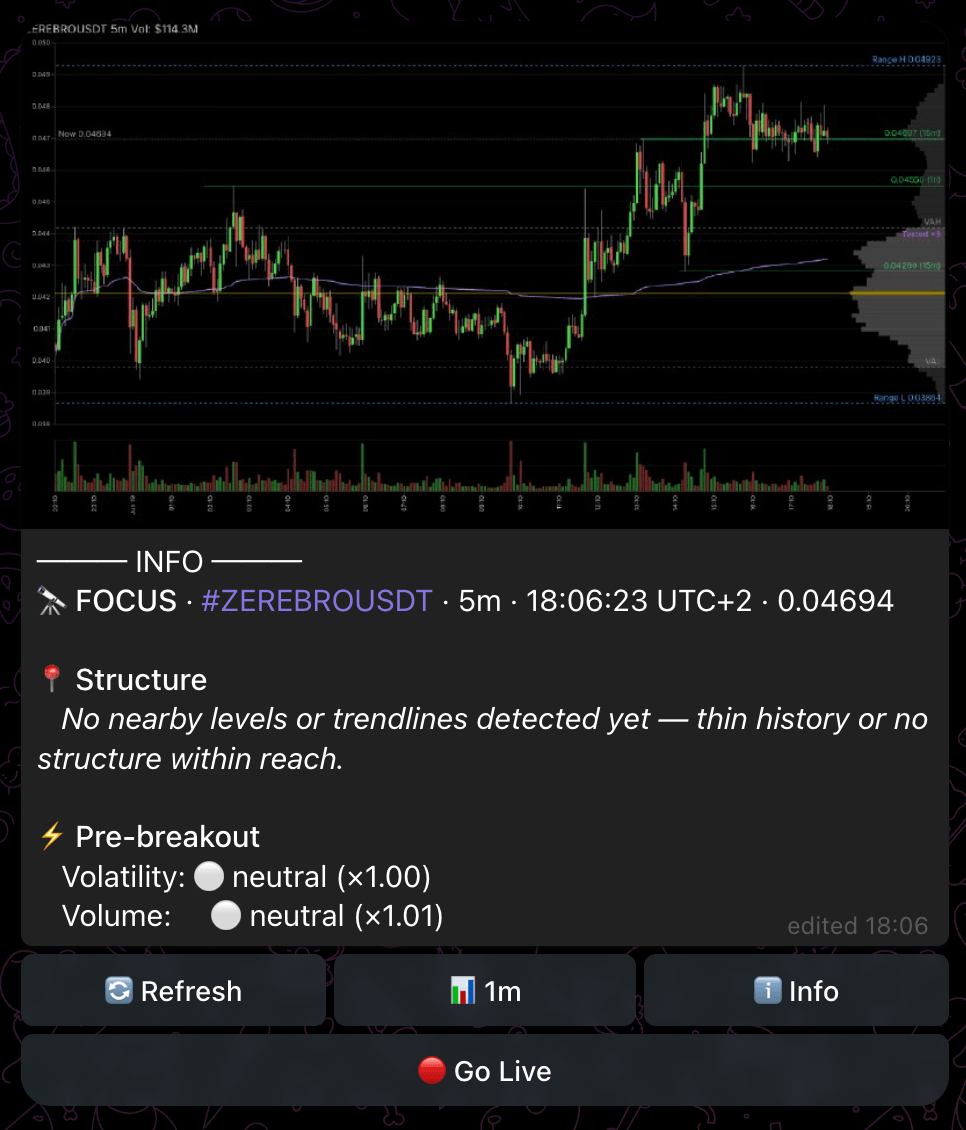
What you see
The dashboard message combines a structural chart with a text read of the coin's current state - price, the nearest levels and trendlines with their distance, and any derivatives context worth noting before entry.
The buttons under the dashboard:
- 🔄 Refresh - rebuild the dashboard with the latest data.
- 📊 1m / 5m - switch the dashboard to the other timeframe.
- ℹ️ Info - jump to instant dry stats for the symbol (see /info).
- 🔴 Go Live - start a live monitor (see below).
Go Live (the live HUD) turns the static dashboard into a self-refreshing heads-up display for the coin:
─── LIVE ───
🔴 LIVE · #SOLUSDT · 1m    ⏳ ends ~14:30 UTC+0
─────────────────────────────
💲 148.52
📍 Structure
   ⬆ Level @ 151.60 · 2.07%
   ⬇ Trendline @ 145.20 · 2.24%
📊 OI 1.3% · Funding 0.012%
⚡ Recent
   ...
─────────────────────────────
⟳ 14:00:12
It updates in place as price, structure and flow change, and carries its own controls:
- ⏹ Stop - end the live monitor.
- ⏳ +30m - extend the live window by 30 minutes.
- 📊 1m / 5m - switch the live timeframe.
The HUD lists the nearest structure (levels and trendlines with side and distance), open-interest and funding when available, and recent events, with a timestamp showing the last content change. It expires automatically at the time shown in the header unless you extend it.
Tips
- Use
/focuson a coin you are about to trade to sanity-check how close price is to the nearest level or trendline before committing. - Switch to 5m for a wider read when 1m is too noisy.
- Reach for 🔴 Go Live when you want to watch an approach into a level resolve without re-running the command.
Related
- /chart - a one-off structural chart on any timeframe (1m to 1d)
- /ai - an AI price-action read on the same coin
- /density - the order-book liquidity and density map
- Concept: Order-book density in trading